Who is eligible?
Employees, guest researchers, PhD candidates, students on the Medical Student Research programme and emeriti affiliated with the Institute of Clinical Medicine.
How to get started with BioRender
- Sign in here.
Use your UiO email address in the format username@uio.no and authenticate with UiO two‑factor authentication. - When asked, enter the name of your clinic.
- On first login you may be asked for your job title and unit. If you don’t find a matching option in the dropdown, you can type your information as free text and add it as a new choice.
- You will be offered a short dashboard setup — you may skip this and customize your dashboard later.
Direct sign-in after initial registration
- Click “Sign in” at the top right of BioRender.com.
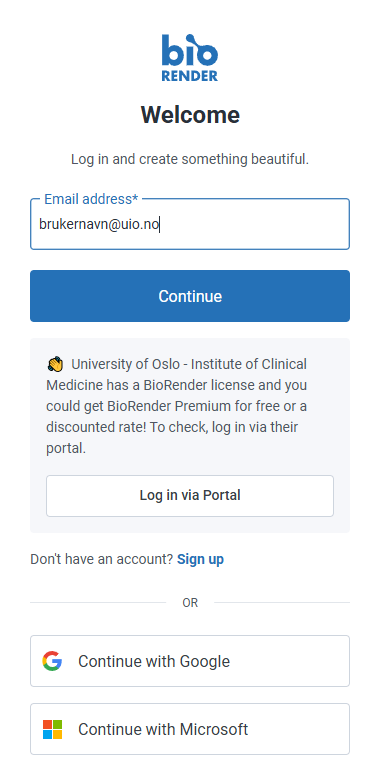
- Enter username@uio.no in the “Email Address” field. Choose “Log in via Portal” when it appears — do not use “Continue with Google” or “Continue with Microsoft.”
No longer affiliated with Institute of Clinical Medicine?
Your BioRender license are tied to your Institute of Clinical Medicine affiliation. If your affiliation ends, your access will be revoked immediately.
If you wish to continue using BioRender after leaving Institute of Clinical Medicine, you must obtain a valid license.
If you lose access to content you need, contact BioRender directly.
Support and help
Institute of Clinical Medicine and UiO do not provide technical or general support for BioRender.
Please use the following resources if you need help:
- Technical issues & support (email)
- Account/access issues (email)
- Built-in chat support: click the question-mark icon at the bottom right when logged in.
- Help articles on BioRender's website
- Issues with UiO two‑factor authentication (email)
BioRender courses for UiO
- Introductory couse for Institute of Clinical Medicine
- BioRender 101 @ UiO (March 5, 2026)
- BioRender 101 @ UiO (September 3, 2026)
- Creating Top Notch Publication Figures
- Top Design Tips for Designing Graphical Abstracts